Introduction
Customizing your website’s header, footer, and overall layout is essential for building a professional WordPress site. But here’s the problem:
👉 Most Elementor users can’t fully control these areas without using multiple plugins—or upgrading to expensive premium tools.
That’s where Zyre Addons stands out.
With its free Theme Builder widget, you can create fully custom headers, footers, and templates directly inside Elementor—without relying on extra plugins.
What is a Theme Builder in Elementor?
A Theme Builder allows you to design and control core parts of your website, such as:
- Header
- Footer
- Single post layout
- Archive pages
- Menu
👉 Instead of being limited by your WordPress theme, you design everything your way.
The Problem with Most Elementor Addons
Most Elementor addons:
❌ Lock Theme Builder Behind Premium
You often need to upgrade just to access basic theme-building features.
❌ Require Multiple Plugins
You may need:
- One plugin for headers
- One for footers
- Another for templates
❌ Limited Customization
Even with premium versions, flexibility is often restricted.
How Zyre Addons Solves This?
Zyre Addons offers a Theme Builder widget completely free—something most addons don’t provide.
👉 You get full control without extra cost or complexity.
⚡ Key Features of Zyre Theme Builder
🧩 1. Create Custom Headers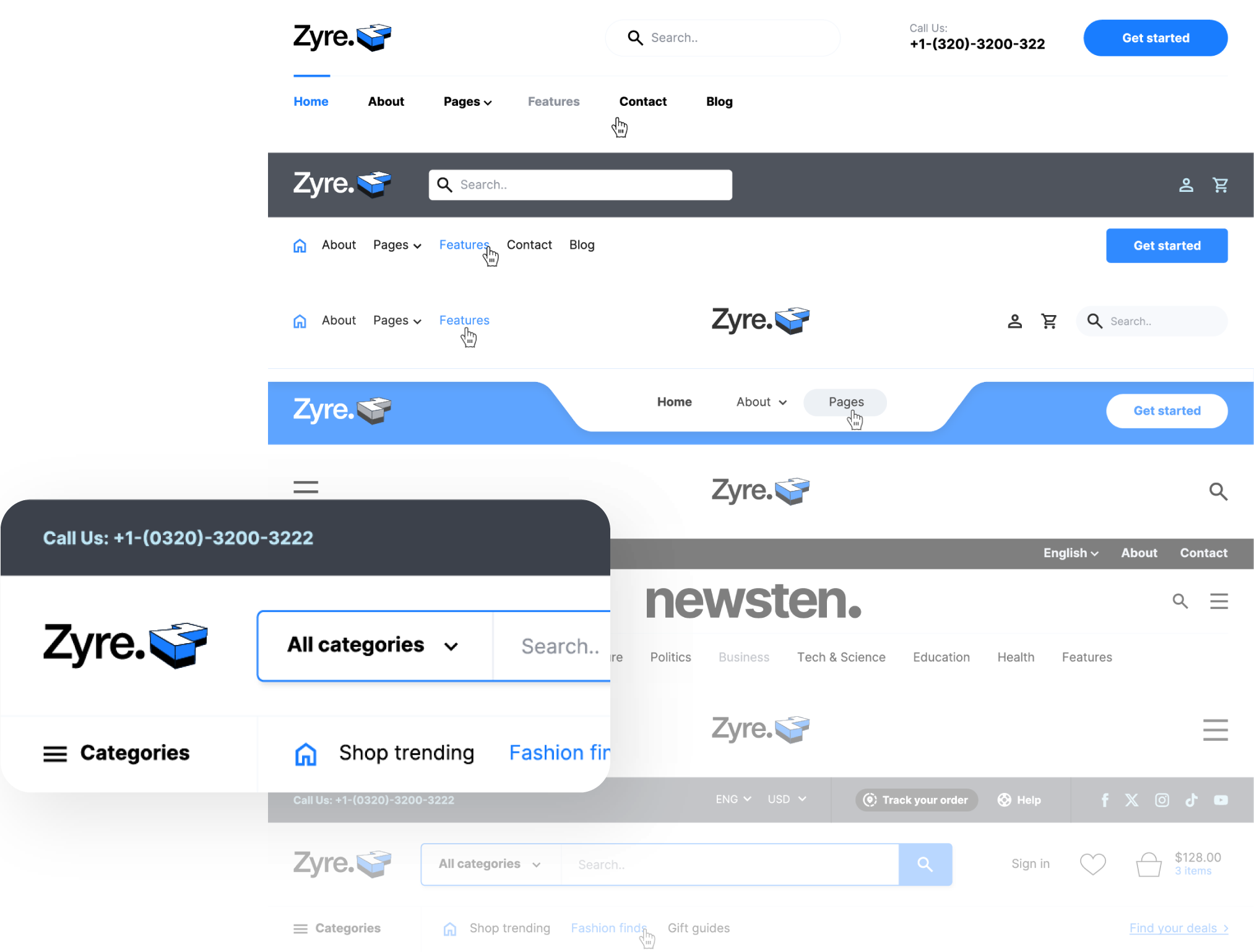
Design your header exactly the way you want:
- Logo placement
- Navigation menus
- CTA buttons
- Sticky header options
👉 Build a unique navigation experience.
📌 2. Design Custom Footers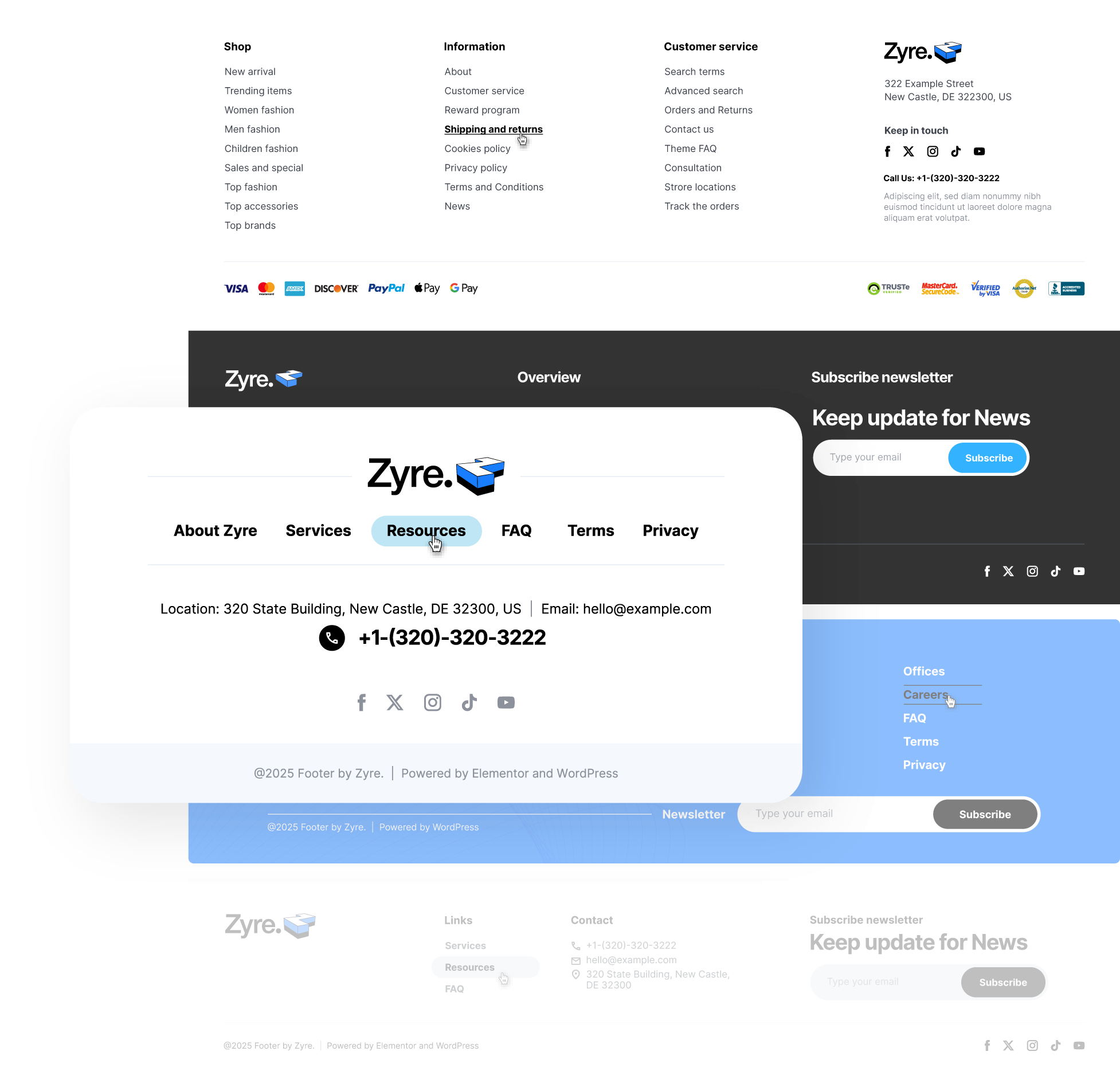
Create fully customized footers with:
- Links and menus
- Contact information
- Social icons
- Branding elements
👉 No more boring default footers.
📄 3. Build Custom Templates
Go beyond header and footer:
- Single post layouts
- Archive pages
- Custom sections
👉 Full website control from one place.
🎨 4. Prebuilt Layout Support
Zyre Addons allows you to:
- Start with ready-made structures
- Customize everything easily
👉 Faster workflow without starting from scratch.
🎛️ 5. Full Design Flexibility
You can control:
- Colors and typography
- Spacing and alignment
- Layout structure
👉 No design limitations.
🚀 Why Zyre Theme Builder is Different
💡 Free Access to Advanced Features
Unlike other addons, Zyre Addons provides Theme Builder functionality for free.
⚙️ No Need for Multiple Plugins
Everything is included in one plugin.
⚡ Lightweight & Optimized
Built with clean code and minimal performance impact.
🔥 Perfect for Real Projects
Designed for actual use cases—not just demos.
Real Use Case Example
Let’s say you want to create a custom website layout.
With Zyre Addons:
- Design a custom header
- Create a branded footer
- Build a blog post template
- Apply it across your site
👉 All without installing extra plugins or upgrading.
Zyre Addons vs Other Addons
| Feature | Zyre Addons | Typical Addons |
|---|---|---|
| Theme Builder | Free | Premium only |
| Header/Footer Control | Full | Limited |
| Plugin Dependency | Single plugin | Multiple plugins |
| Custom Templates | Available | Often restricted |
| Cost | Free | Paid |
Who Should Use This?
Zyre Theme Builder is perfect for:
- Freelancers building client websites
- Agencies managing multiple projects
- Beginners who want easy customization
- Developers who want flexibility
Pro Tips for Better Results
- Keep your header clean and minimal
- Use clear navigation for better UX
- Add strong CTA buttons
- Maintain consistent branding
👉 Small improvements create a big impact.
Final Thoughts
Theme building is one of the most powerful features in modern web design.
But most tools either:
- Restrict it
- Complicate it
- Or charge for it
Zyre Addons changes that.
With its free Theme Builder widget, you get:
- Full control
- Faster workflow
- Better design flexibility
👉 All without extra cost or complexity.
Download Zyre Addons from WordPress